Installation
Prerequisites
- Python 3.11.9
- A GitHub Personal Access Token (PAT) with
reposcope (see below) - pyproject.toml in the root directory of your project
- development.env in the root directory of your project
Installation
Personal Access Token (PAT)
In order to build and update this repository, you will need a classic Personal Access Token (PAT) with the repo scope. This token must be issued as a classic token scoped to repos you have access to, not a fine-grained token scoped to your personal account.
See Generating a Personal Access Token for step-by-step instructions.
Once you have your token, run the following command in a command prompt (replace YOUR_TOKEN_HERE with your token):
mkdir "%USERPROFILE%\stratus" 2>NUL & echo YOUR_TOKEN_HERE > "%USERPROFILE%\stratus\dev_tool_github_pat"
Install the dev_tool
- Download the latest release:
- Navigate to the latest release
- Download
dev_tool_windows_x.x.xx.exeandcli_windows_x.x.xx.exe
- Setup the launcher:
- Rename
dev_tool_windows_x.x.xx.exetodev_tool.exe - Move it to
%USERPROFILE%/stratus/
- Rename
- Setup the CLI:
- Rename
cli_windows_x.x.xx.exetocli.exe - Move it to
%USERPROFILE%/stratus/
- Rename
- Add the
stratusdirectory to the Windows PATH:- Go to the Start Menu, type "environment variables" and select "Edit environment variables for your account"
- Under the "User variables for <Account Name>", find the "Path" variable and select "Edit"
- Click "New" and enter:
%USERPROFILE%\stratus - Press "OK" and close the window
- Close or restart your IDE or text editor
- Open a terminal in the project root, and type "dev_tool.exe" in the terminal to use it
Updating
Update dev_tool.exe (Manually)
- Download the latest release
- Close PyCharm and any running instances of the dev-tool
- Replace the old
dev_tool.exein the%USERPROFILE%\stratusdirectory
Update cli.exe
Automatically
- Open
dev_tool.exe - Navigate to the Other tab
- Select the
Check for updatesoption
Manually
- Download the latest release
- Close all running instances
- Delete older executables from
%USERPROFILE%/stratus - Rename the new file to
cli.exeand place it in%USERPROFILE%/stratus
Generating a Personal Access Token
Your GitHub PAT allows the dev_tool to download updates from our private repository. The tokens expire periodically and will need to be regenerated. If updates start failing with a 404 or 401 error, then your token has likely expired.
You must use a classic token, not a fine-grained token. Fine-grained tokens are scoped to your personal account and cannot access organization repositories.
Step-by-step
-
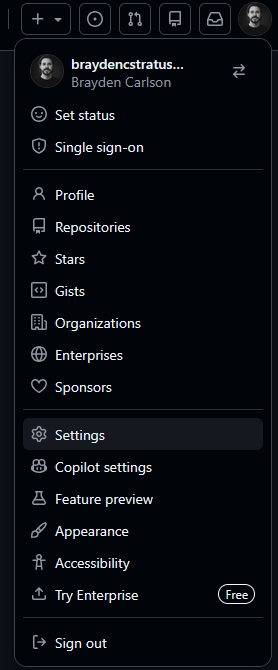
Click on your avatar/profile picture in the top-right corner of GitHub
-
Click on Settings
-
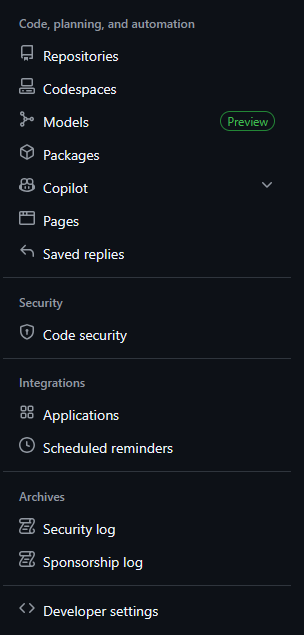
Scroll to the bottom of the left sidebar and click Developer settings
-
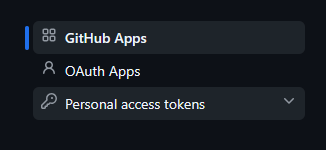
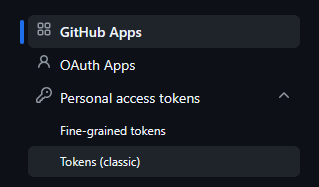
Click Personal access tokens and select Tokens (classic)
-
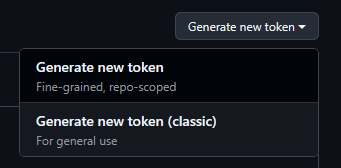
Click the Generate new token dropdown and select Generate new token (classic)
-
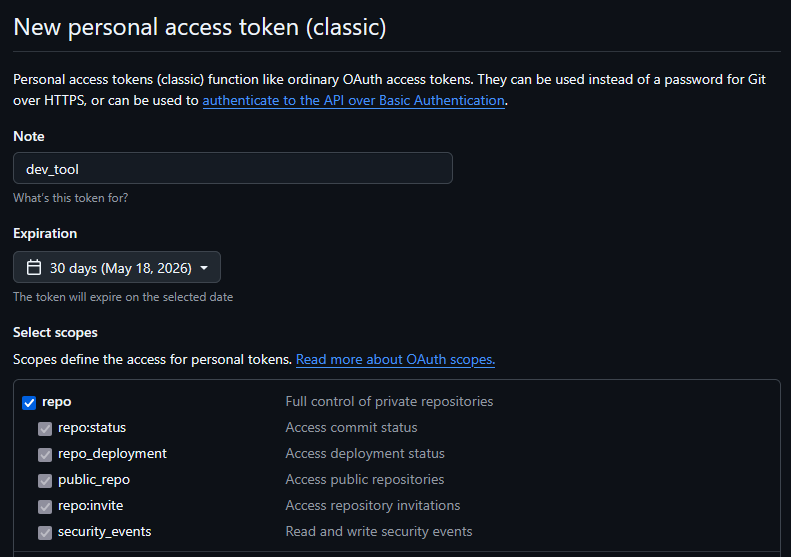
Fill in the token details:
- Set the Note to
dev_tool - Set the Expiration (30, 60, or 90 days recommended)
- Check the repo checkbox (full control of private repositories)
- Set the Note to
-
Scroll to the bottom and click Generate token
-
Copy the token immediately (you will not be able to see it again)
-
Open
%USERPROFILE%/stratus/dev_tool_github_patin a text editor, replace the token with the new token, and save
Configuration
pyproject.toml
Create a pyproject.toml file in the root directory of your project with appropriate configuration settings for your project. See the documentation for details.
development.env
Create a development.env file in the root directory of your project with the necessary environment variables. An up-to-date list can be found in the BitWarden vault.
Development
To build the tool:
API Key for stratusadv-portal and guardian
stratus_developer_api_token
Create a stratus_developer_api_token file in %USERPROFILE%/stratus and paste your API key into it. You will need to ask a supervisor to generate one for you. This grants access to environment variables and anonymized databases.
Note: API keys are generated once and cannot be recovered. If lost, you will need to request a new one.